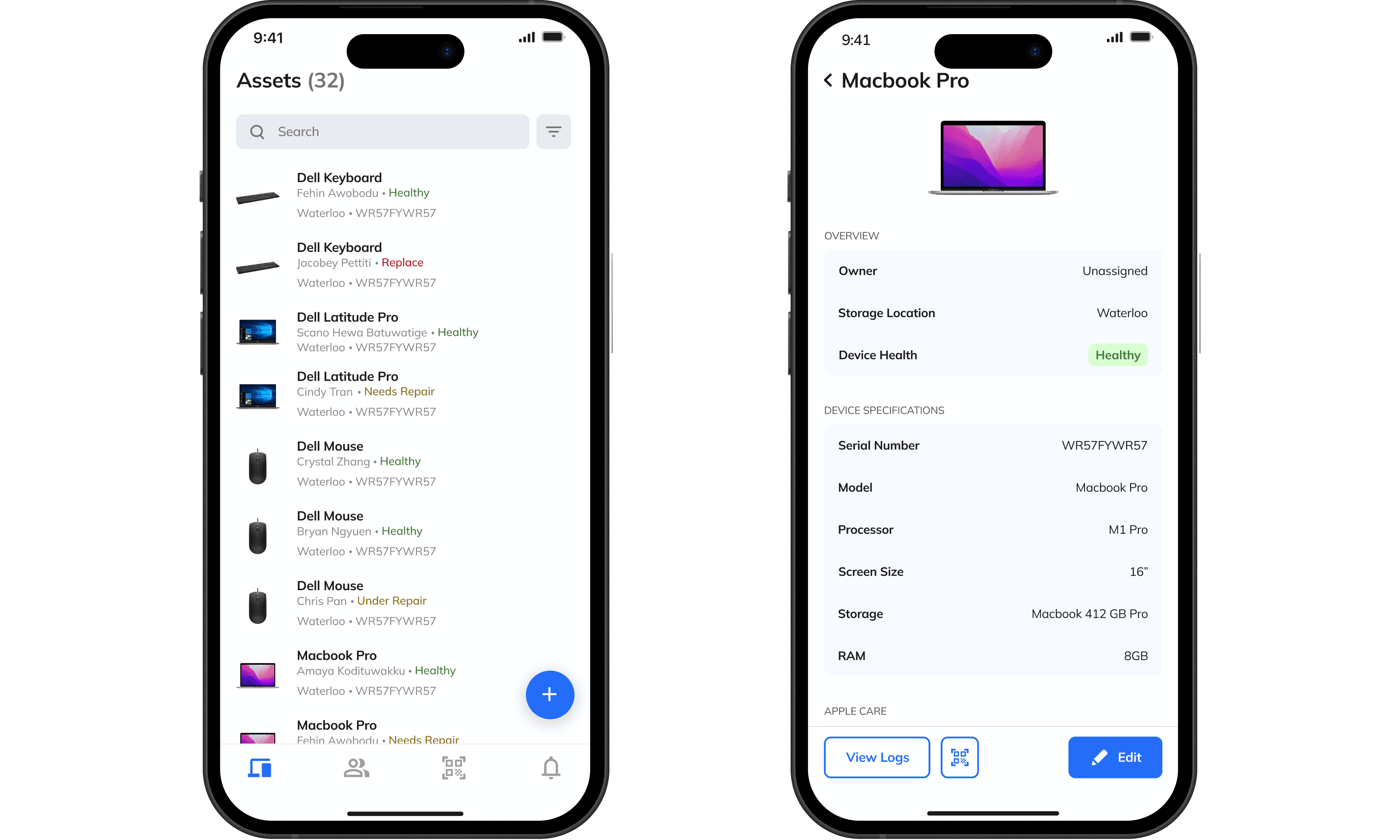
Asset Tracker
Modernizing the management and tracking of IT assets.
my role
Product Designer
Product Designer
Product Designer
team

4 Product Designers
1 Project Lead
4 Product Designers
1 Project Lead
4 Product Designers
1 Project Lead
client
tools
Figma
Figma
Figma

Maze
Maze
Maze
Timeline
May 2024 - August 2024
May 2024 - August 2024
May 2024 - August 2024
context
The WSIB Innovation Lab is a multidisciplinary team focused on designing and testing digital solutions that improve workplace safety across Ontario. Through agile sprints, diverse co-op talent, and close collaboration between design and development, the Lab rapidly experiments, iterates, and brings ideas to life.
The WSIB Innovation Lab is a multidisciplinary team focused on designing and testing digital solutions that improve workplace safety across Ontario. Through agile sprints, diverse co-op talent, and close collaboration between design and development, the Lab rapidly experiments, iterates, and brings ideas to life.
The WSIB Innovation Lab is a multidisciplinary team focused on designing and testing digital solutions that improve workplace safety across Ontario. Through agile sprints, diverse co-op talent, and close collaboration between design and development, the Lab rapidly experiments, iterates, and brings ideas to life.
problemspace
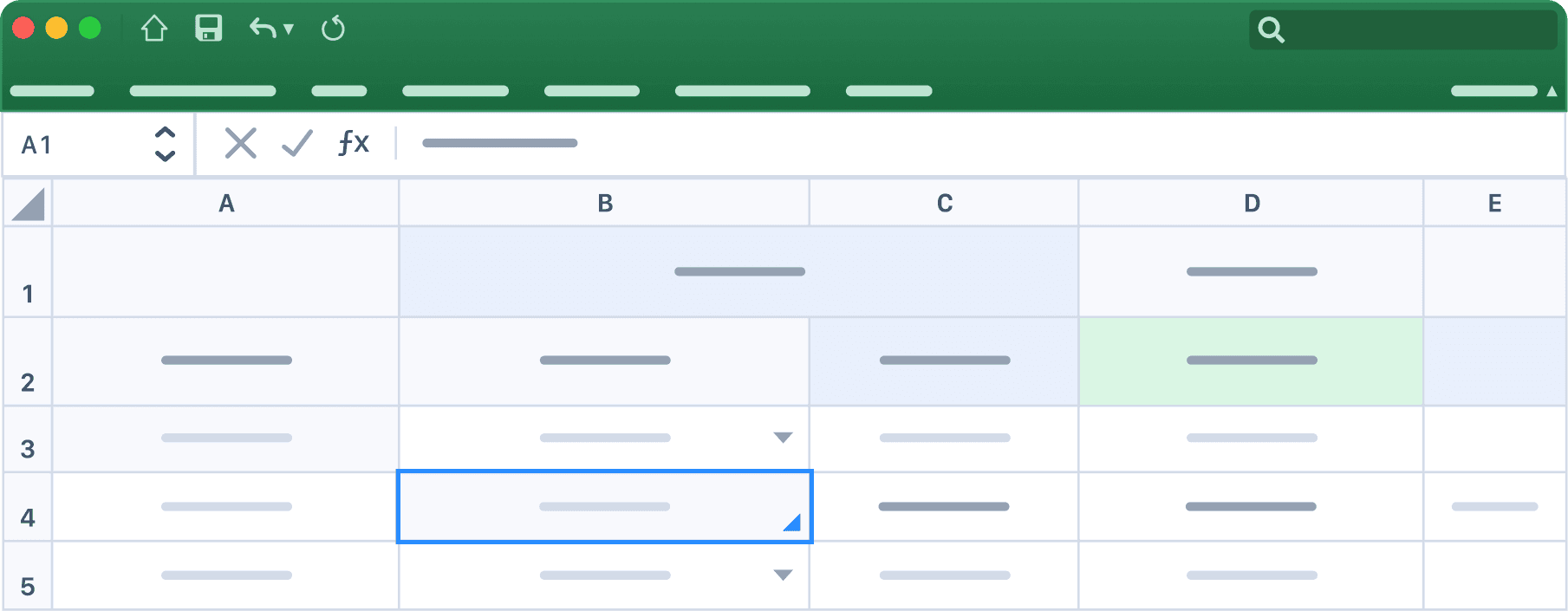
How do you keep track of dozens of laptops, cables, and monitors across a rotating workforce without relying on outdated spreadsheets?
How do you keep track of dozens of laptops, cables, and monitors across a rotating workforce without relying on outdated spreadsheets?
Our design team set out to solve this with a digital asset tracker: a tool that uses QR codes to connect physical devices to a digital system.
Our design team set out to solve this with a digital asset tracker: a tool that uses QR codes to connect physical devices to a digital system.
Our design team set out to solve this with a digital asset tracker: a tool that uses QR codes to connect physical devices to a digital system.


Skip to Final Designs
user research
User interviews surfaced friction hidden inside everyday workflows.
User interviews surfaced friction hidden inside everyday workflows.
User interviews surfaced friction hidden inside everyday workflows.
By talking to department managers and team leads, we learned how assets were tracked, pain points with current tools, and desired improvements. Key questions that were asked:
By talking to department managers and team leads, we learned how assets were tracked, pain points with current tools, and desired improvements. Key questions that were asked:
By talking to department managers and team leads, we learned how assets were tracked, pain points with current tools, and desired improvements. Key questions that were asked:
Who within the team tracks the assets?
What is the current process of tracking assets?
How often do devices get cycled?
How are maintenance processes handled?
What are some difficulties you encountered?
Who within the team tracks the assets?
What is the current process of tracking assets?
How often do devices get cycled?
How are maintenance processes handled?
What are some difficulties you encountered?
Who within the team tracks the assets?
What is the current process of tracking assets?
How often do devices get cycled?
How are maintenance processes handled?
What are some difficulties you encountered?
After synthesizing our findings using affinity mapping, some common themes that came up:
After synthesizing our findings using affinity mapping, some common themes that came up:
After synthesizing our findings using affinity mapping, some common themes that came up:
💢
Asset tracking responsibilities are often unclear and inconsistently documented.
Asset tracking responsibilities are often unclear and inconsistently documented.
⌛
Spreadsheets are time-consuming, error-prone, and lack visibility across teams.
Spreadsheets are time-consuming, error-prone, and lack visibility across teams.
💻
Users want a quick way to bulk assign or return assets during onboarding/offboarding.
Users want a quick way to bulk assign or return assets during onboarding/offboarding.
initial designs
Design critiques quickly revealed what wasn’t working.
Design critiques quickly revealed what wasn’t working.
Design critiques quickly revealed what wasn’t working.
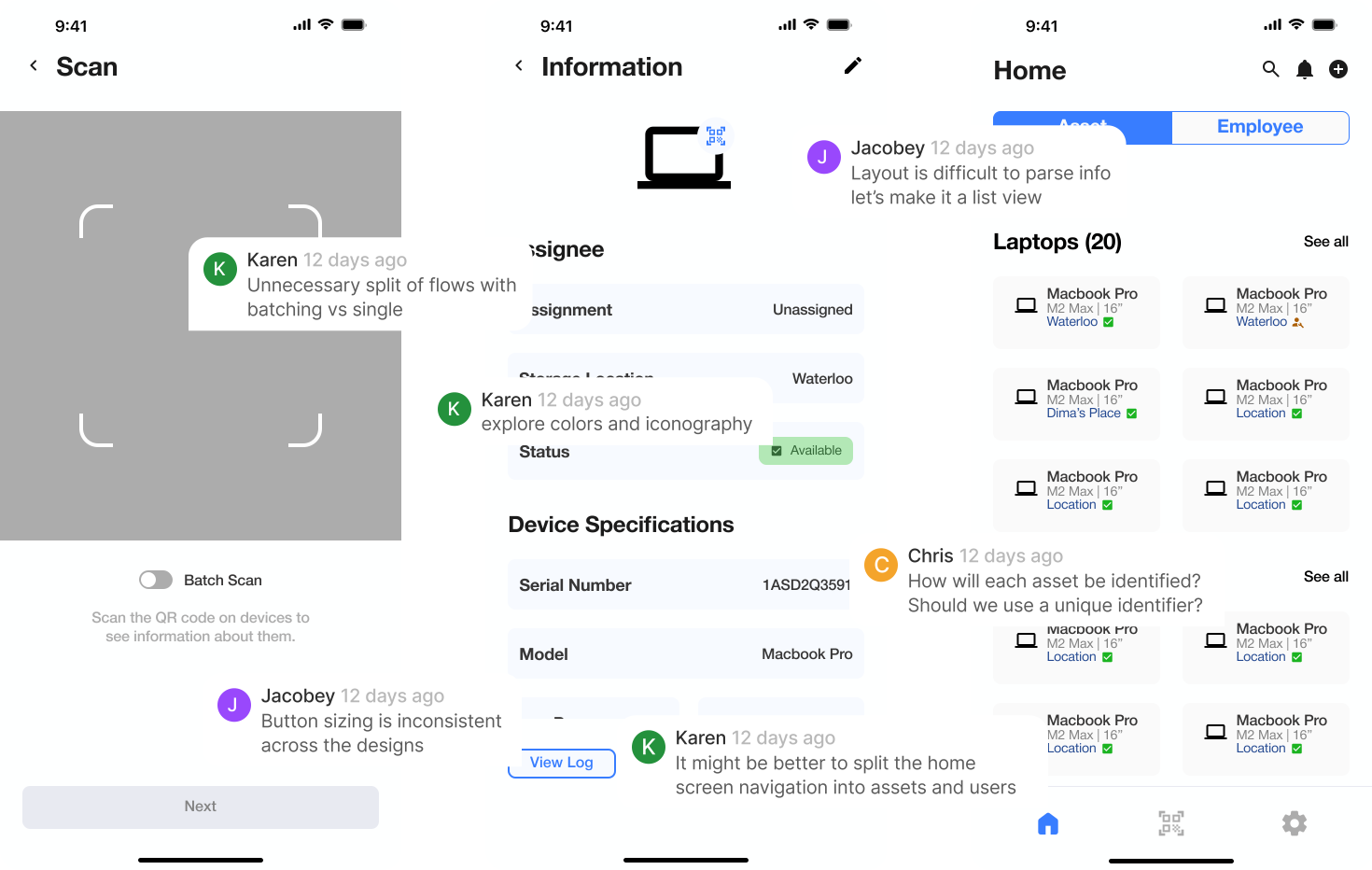
Our team received early-stage concepts and rough wireframes from a previous design cohort. Early feedback from team critiques helped us identify usability and consistency issues that would shape the direction of our redesign. These sessions were crucial in aligning on layout, interaction patterns, visual clarity, and feature functionality.
Our team received early-stage concepts and rough wireframes from a previous design cohort. Early feedback from team critiques helped us identify usability and consistency issues that would shape the direction of our redesign. These sessions were crucial in aligning on layout, interaction patterns, visual clarity, and feature functionality.
Our team received early-stage concepts and rough wireframes from a previous design cohort. Early feedback from team critiques helped us identify usability and consistency issues that would shape the direction of our redesign. These sessions were crucial in aligning on layout, interaction patterns, visual clarity, and feature functionality.
Home Screen
Design tradeoffs: Sometimes less is more.
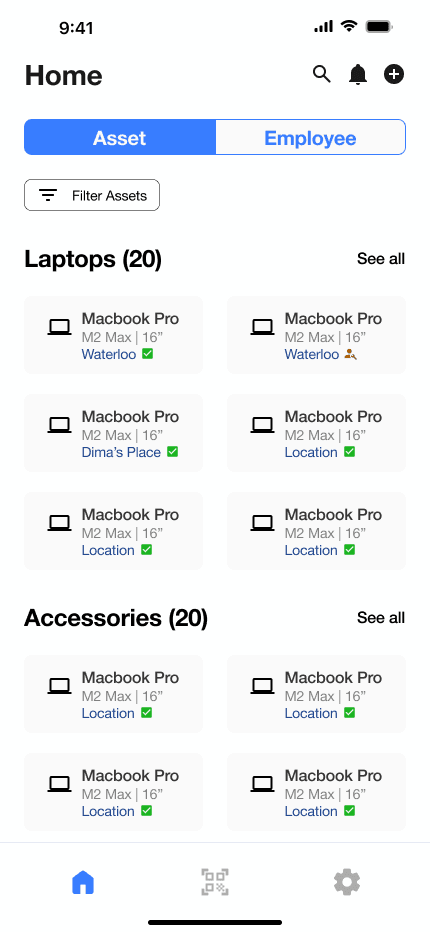
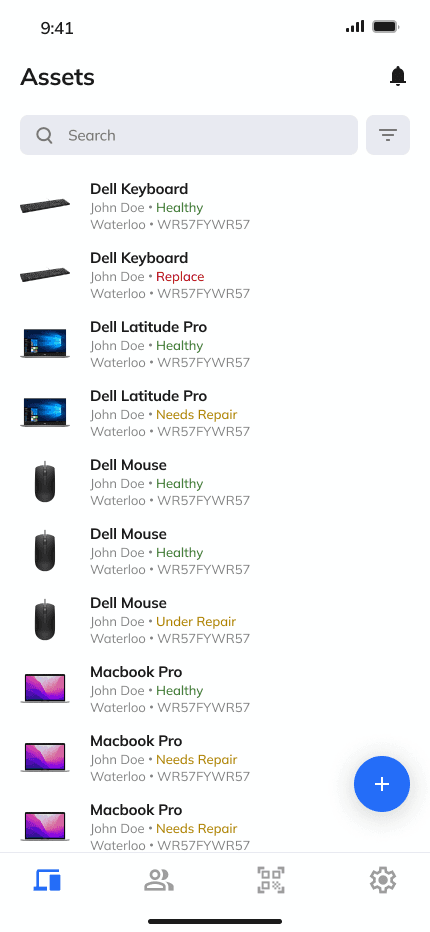
We redesigned the home screen to create a clearer, more focused experience. By simplifying the layout and restructuring navigation, users can now access key information more efficiently.
We redesigned the home screen to create a clearer, more focused experience. By simplifying the layout and restructuring navigation, users can now access key information more efficiently.
We redesigned the home screen to create a clearer, more focused experience. By simplifying the layout and restructuring navigation, users can now access key information more efficiently.
Old
New
Grouped search and filter function.
Emphasized add asset/employee action.
Separated assets & users in nav bar.
Overhauled list layout.
Made the experience more visual.
Reprioritized metadata.
Batch vs. Single Scan
Iterate, Iterate, Iterate…
Iterate, Iterate, Iterate…
Iterate, Iterate, Iterate…
After extensive critique sessions, we shifted away from mode-based scanning and introduced a cart-style batch experience. Leveraging a familiar mental model, the design allows users to scan assets freely, see what’s been collected, and take action when ready, without interrupting the physical scanning flow.
After extensive critique sessions, we shifted away from mode-based scanning and introduced a cart-style batch experience. Leveraging a familiar mental model, the design allows users to scan assets freely, see what’s been collected, and take action when ready, without interrupting the physical scanning flow.
After extensive critique sessions, we shifted away from mode-based scanning and introduced a cart-style batch experience. Leveraging a familiar mental model, the design allows users to scan assets freely, see what’s been collected, and take action when ready, without interrupting the physical scanning flow.
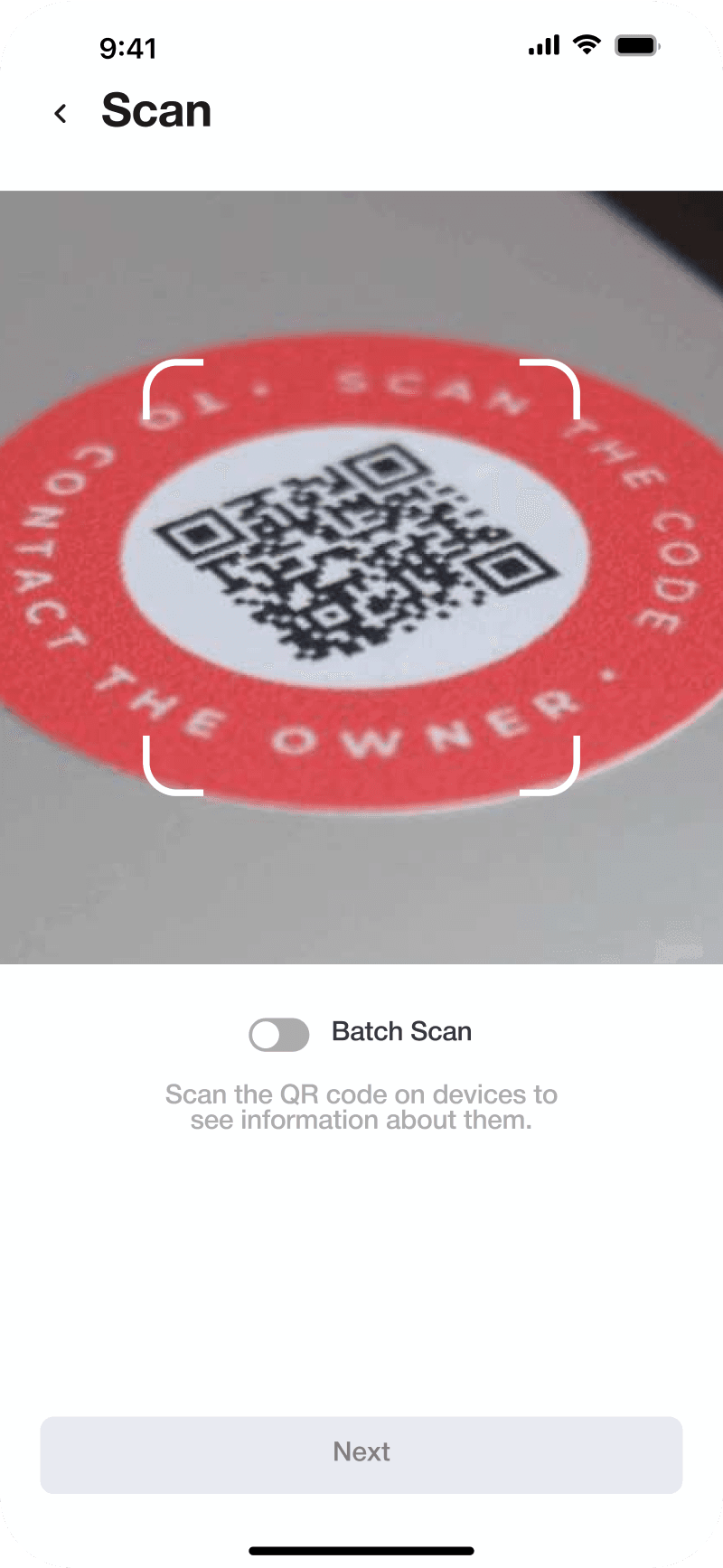
Single
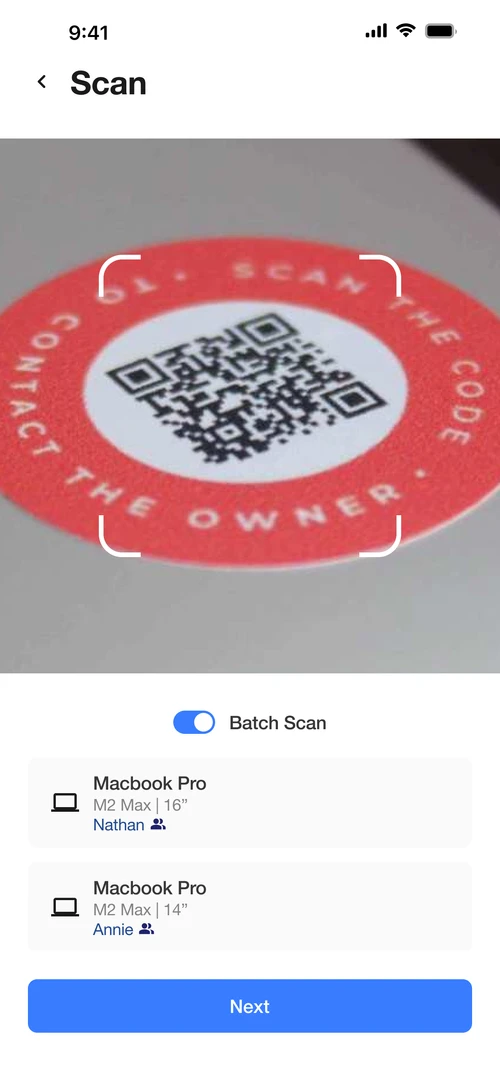
Batch
Initial Design
Mode ambiguity increased cognitive load
Toggling between single and batch scan made users track system state mentally, increasing confusion during fast scanning
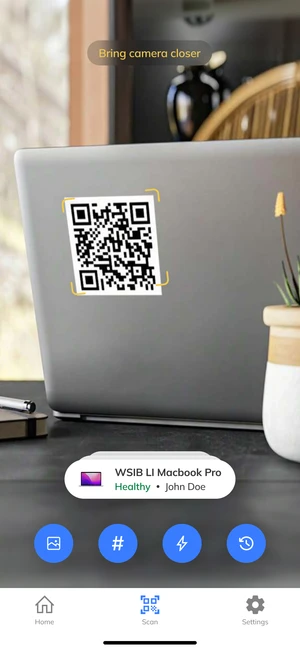
Version 2
Prioritized an immersive, full-screen camera experience to make scanning the primary focus.
Introduced stacked, clickable scan pills and multiple action buttons to support batch scanning and alternate inputs.
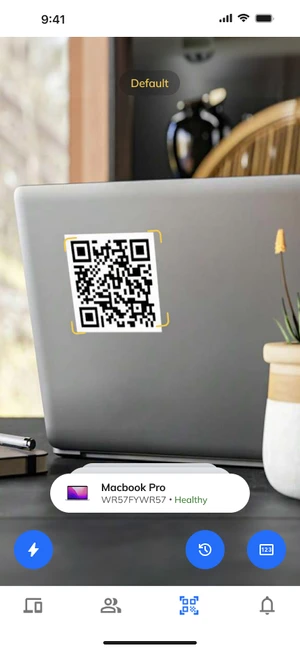
Version 3
Improved clarity by grouping controls into actions vs. inputs and removing less-used features
Reduced visual noise but still relied on stacking scanned items, which began to feel dense at scale.
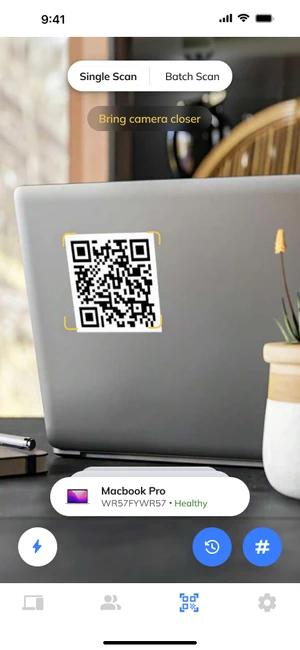
Version 4
Attempted to clarify single vs. batch scanning with a toggle pill between modes.
Introduced mode-switching clarity but increased cognitive load and visual clutter during active scanning.
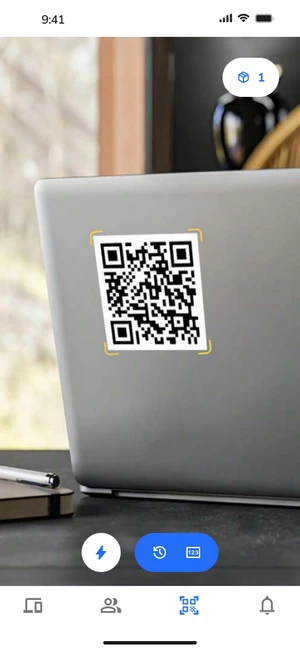
Scan Screen
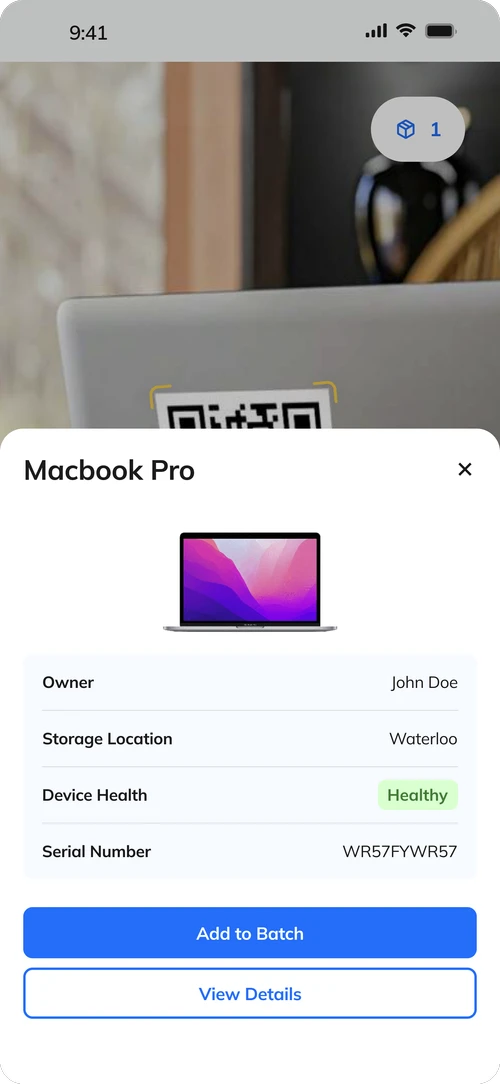
Asset Card
Final Design
Replaced stacked scans with a batch button (cart-like pattern) to make batch behavior explicit and scalable.
Presented scanned assets as cards with clear next actions, while tightening button grouping to improve ergonomics and speed.
User testing & metrics
Data validation: Success Metrics
Data validation: Success Metrics
Data validation: Success Metrics
User testing on Maze confirmed that the revised scanning experience improved clarity and confidence without sacrificing speed, validating the design tradeoff of explicit review in a data-heavy workflow. Some key metrics:
User testing on Maze confirmed that the revised scanning experience improved clarity and confidence without sacrificing speed, validating the design tradeoff of explicit review in a data-heavy workflow. Some key metrics:
User testing on Maze confirmed that the revised scanning experience improved clarity and confidence without sacrificing speed, validating the design tradeoff of explicit review in a data-heavy workflow. Some key metrics:
90.9% end-to-end task success rate, low drop-off (9.1%)
Average completion time of 38 seconds to scan and review three assets
Overall sentiment was strong, with 94% positive or neutral participant feedback
User Testing
/
Report
You're a manager of an intern cohort and the term is over. Please scan
three assets to return as a batch and then view your scanned list.
Prototype Test
86
38.0s
Avg. duration
11
Responses
Mission's overview
A high-level view of this mission’s data
90.9%
Success rate
9.1%
Drop-off
61.6%
Misclick rate
Sentiment
Positive
Neutral
Negative
0%
25%
50%
75%
100%
final project showcase
Final Designs
Final Designs
Final Designs

Add New Asset
Seamlessly add an asset to the app by filling in the asset details and assigning the asset to a user.

View Asset Details
View and edit asset metadata such as owner, health status, and warranty expiration date within the asset details page.

Filter & Search
Filter and search for users by team, position, location, etc.

Batch Scan
From the scan page, scan the unique QR code attached to every asset to view asset details or add the asset to a batch.

Batch Return
While offboarding employees, bulk unassign and return assets to a specified location after batch scanning their assets.
Batch Return
While offboarding employees, bulk unassign and return assets to a specified location after batch scanning their assets.
next steps
After validating the core MVP, designs were handed off to the next cohort to finalize and expand based on technical scoping and implementation constraints.
After validating the core MVP, designs were handed off to the next cohort to finalize and expand based on technical scoping and implementation constraints.
Future work includes clarifying asset scope across device types, refining notification and approval flows, addressing edge cases such as duplicate assets or employees, and exploring scalability considerations like batch actions, imports, and responsiveness.
Future work includes clarifying asset scope across device types, refining notification and approval flows, addressing edge cases such as duplicate assets or employees, and exploring scalability considerations like batch actions, imports, and responsiveness.
These directions were intentionally documented to ensure continuity and allow the next team to build on a well-tested foundation rather than revisit early design decisions.
These directions were intentionally documented to ensure continuity and allow the next team to build on a well-tested foundation rather than revisit early design decisions.
reflection & takeaways
Thanks to everyone at WSIB!
Thanks to everyone at WSIB!
Over the term, I learned SO MUCH from my fellow designers. Whether it was tips on animating within Figma, design best practices, or dealing with variables and advanced prototyping, I owe so much of my growth to them <3.
Over the term, I learned SO MUCH from my fellow designers. Whether it was tips on animating within Figma, design best practices, or dealing with variables and advanced prototyping, I owe so much of my growth to them <3.

group photo of the design team :)
group photo of the design team :)